Theme Settings
BeeCount supports custom theme colors for a personalized interface.
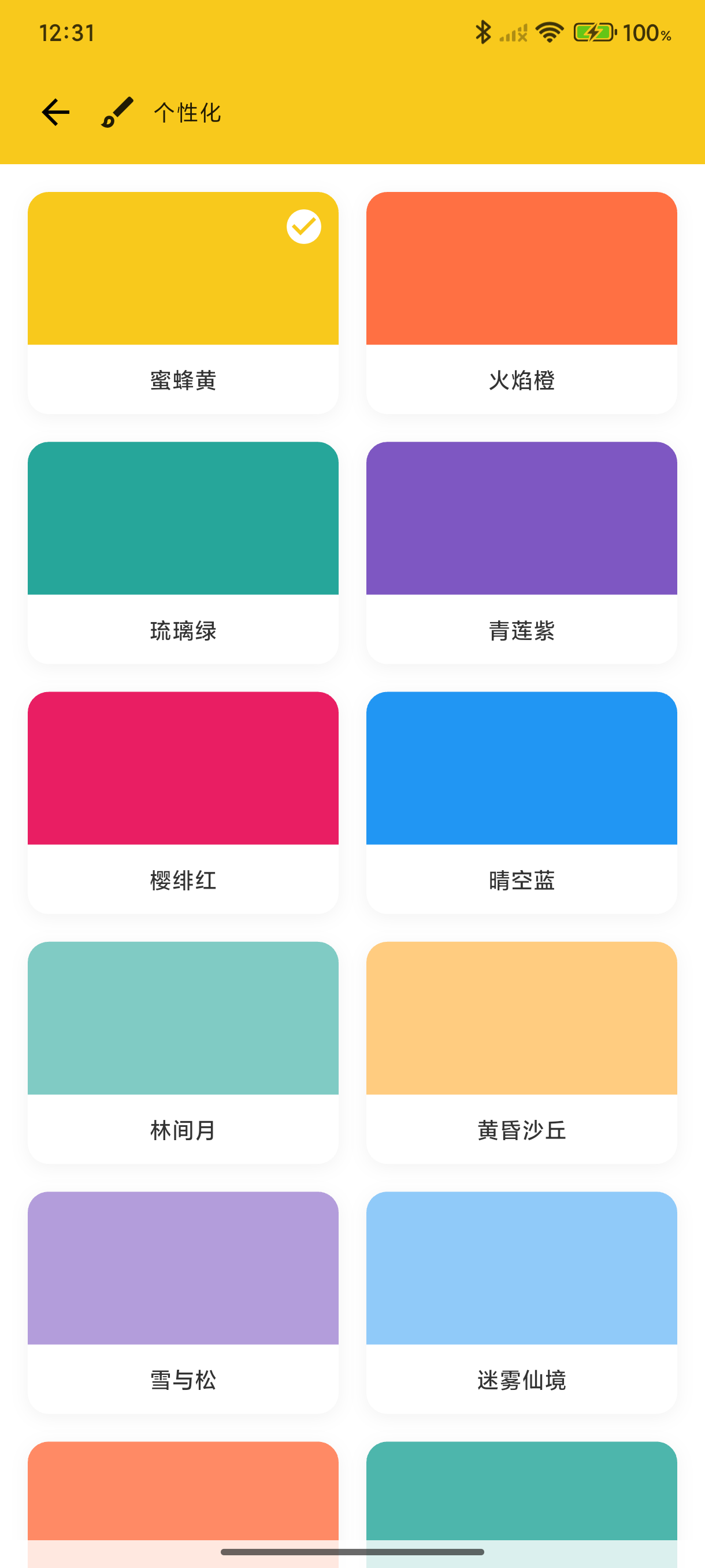
Change Theme Color
- Go to "Me" → "Personalization"
- Tap "Theme Color"
- Choose a preset color or customize
Preset Colors
- 🟡 Bee Yellow - Default theme color
- 🔵 Sky Blue
- 🟢 Forest Green
- 🟣 Elegant Purple
- 🔴 Passion Red
- 🟠 Vibrant Orange
Custom Colors
Tap the palette icon to select any color as your theme color.
Theme Color Application
The theme color is applied to:
- Navigation bar
- Buttons
- Selected states
- Icon accents
- Chart colors
Skins
✨ New in v3.3.0
"Personalization" now includes Skins: decorative header artwork that follows your theme color, in both light and dark mode.
- Built-in gradient / scene / geometric styles, organized by series
- Syncs across devices
- Config import/export so you can share your setup
Animated skins
✨ New in v3.7.1
Constellation No.1 and Birthday Cake are BeeCount's first animated skins, released to mark one year since the first version. They sit at the top of the skin picker with a "1st" badge:
- Constellation No.1 — ten stars forming a "1", with a glowing bee trailing a comet tail as it circles, over a milky way, nebula, crescent moon, and shooting stars
- Birthday Cake — a cake with a candle shaped like a "1", its flame flickering as sugar sparks drift upward
Some skins carry their own palette (Birthday Cake's cream gold, for one). Picking those switches the app's theme color to match, and switching back to an ordinary skin restores the color you had chosen yourself — so you never end up with a header in one color and buttons in another. These skins are labeled "Own palette" in the picker, and their previews render in their own color.
Skin animation switch
✨ New in v3.7.1
Personalization → Skin animation. Turn it off and animated skins freeze on a still frame — chosen at the moment each composition is most complete, so the static version looks good in its own right — while using less power.
The system's "Reduce motion" accessibility setting takes priority: when it's on, animation stops regardless of this switch.
Font Size
Adjust the app font size:
- Small
- Standard (default)
- Large
- Extra Large
Suitable for users with different visual needs.
Web Theme Color
Sign in to BeeCount Cloud on the web → avatar menu → Profile → top "Theme color" chip:
- Opens a PrimaryColorPicker — the same 20-color palette as mobile (deep orange / pink / purple / blue / green ...)
- Web is local-first — changes are stored in the current browser's localStorage and don't push back to mobile
- Mobile pushes forward — mobile theme changes auto-deploy to web; once you've overridden it locally, subsequent mobile changes won't overwrite your local pick